First Impressions of DeepSeek Harness: Everything Being a Plugin Is Too Cool
DeepSeek Harness was released last Friday. Within a few hours, it was everywhere in AI communities in China and abroad.
I downloaded it right away and tried it. If you only look at the default interface, the first impression is honestly a bit rough. There are not many feature entry points. It does not even have a client yet. The interaction details are not as complete as Codex, Claude Code, or WorkBuddy. Those products have already been polished for a while. You can open them and start working, and many workflows have already been thought through for you. DeepSeek Harness is still in Developer Preview, and the official README directly says that breaking changes may happen.
But completion was clearly not what people cared about this time.
The core idea of DeepSeek Harness can be summarized in one sentence: everything is a plugin.
Almost everything can be changed.
That sentence may not mean much to ordinary users, but it is hard to resist if you like tinkering with tools. It does not feel like a Coding Agent whose functionality has already been sealed. It feels more like an Agent framework that can keep being assembled. The interface, tools, workflows, and some product capabilities that would normally be decided by the official team can all be reorganized through plugins.
So on launch day, a large number of community plugins appeared very quickly. Some people added missing features. Some changed the interface. Some even asked DeepSeek Harness to write plugins for itself. That speed was interesting. People have already seen many Coding Agents. What made this one exciting was that you could take it apart and change it freely.
Why “Everything Is a Plugin” Is So Attractive
My main AI product is usually Codex. Like other consumer-facing agent tools, its advantage is maturity. Permissions, tool calls, context management, and task execution flow are all relatively complete. The tradeoff is also obvious: there is not much room for tinkering. Codex is already better than many tools in this regard. There was even a small wave of community-generated themes before.
Different people also use Coding Agents in very different ways.
Some people only need a terminal window. Some want to see the entire task execution process. Some care a lot about token usage. Some only care about the final code. Others want the Agent to run several subtasks in parallel, but if there is no clear status panel, the whole process feels like opening a mystery box.
It is hard for one fixed interface to satisfy all of these needs.
DeepSeek Harness takes a very hacker-friendly approach: the default version provides a runnable skeleton, and the rest is left to plugins. The official architecture is based on Cordis. Plugins can be combined, replaced, and even adjusted dynamically at runtime. It does not look that polished right now, but the boundary is open enough. For people willing to build their own setup, roughness is not a big problem. If something feels awkward, you can change it yourself.
After seeing this design, my first reaction was direct: can I bring over the parts of Codex that I like?
So I asked it to write a plugin for itself.
I have put the code on GitHub: careywyr/dsh-code. The repository includes an installation script and the full source code. If you are interested, you can try it directly. DeepSeek Harness is still moving quickly, so if the plugin breaks because of a new version, feel free to open an Issue in the repository.
I Added a Codex-Style Experience to It
The goal of this plugin is simple. It borrows from the way I use Codex and puts the information I care about into the DeepSeek Harness interface.
The final feature set includes:
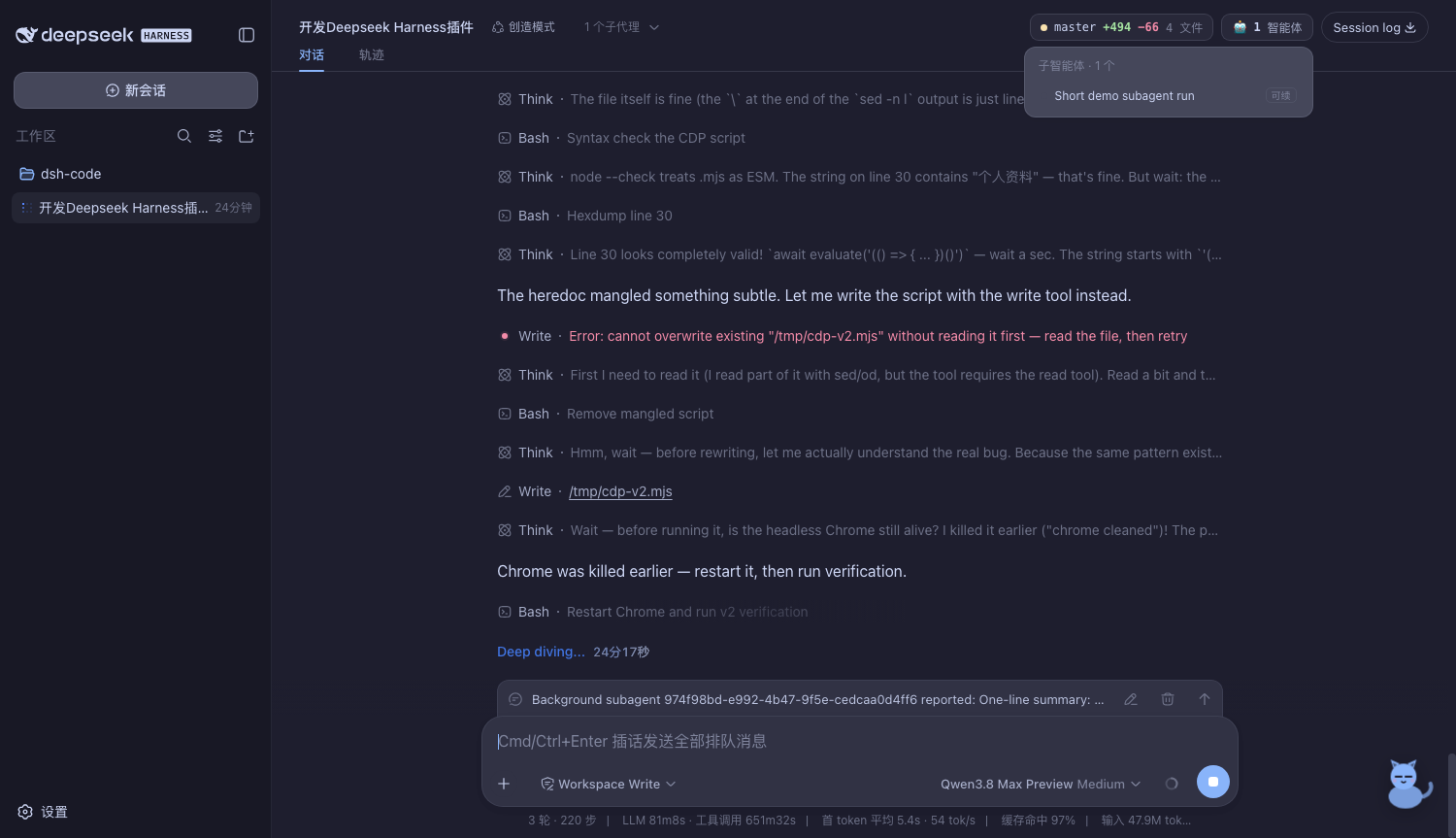
- a subagent activity board, so you can see what each Agent is currently doing;
- a Git changes board, so you can view which files were modified in the current task;
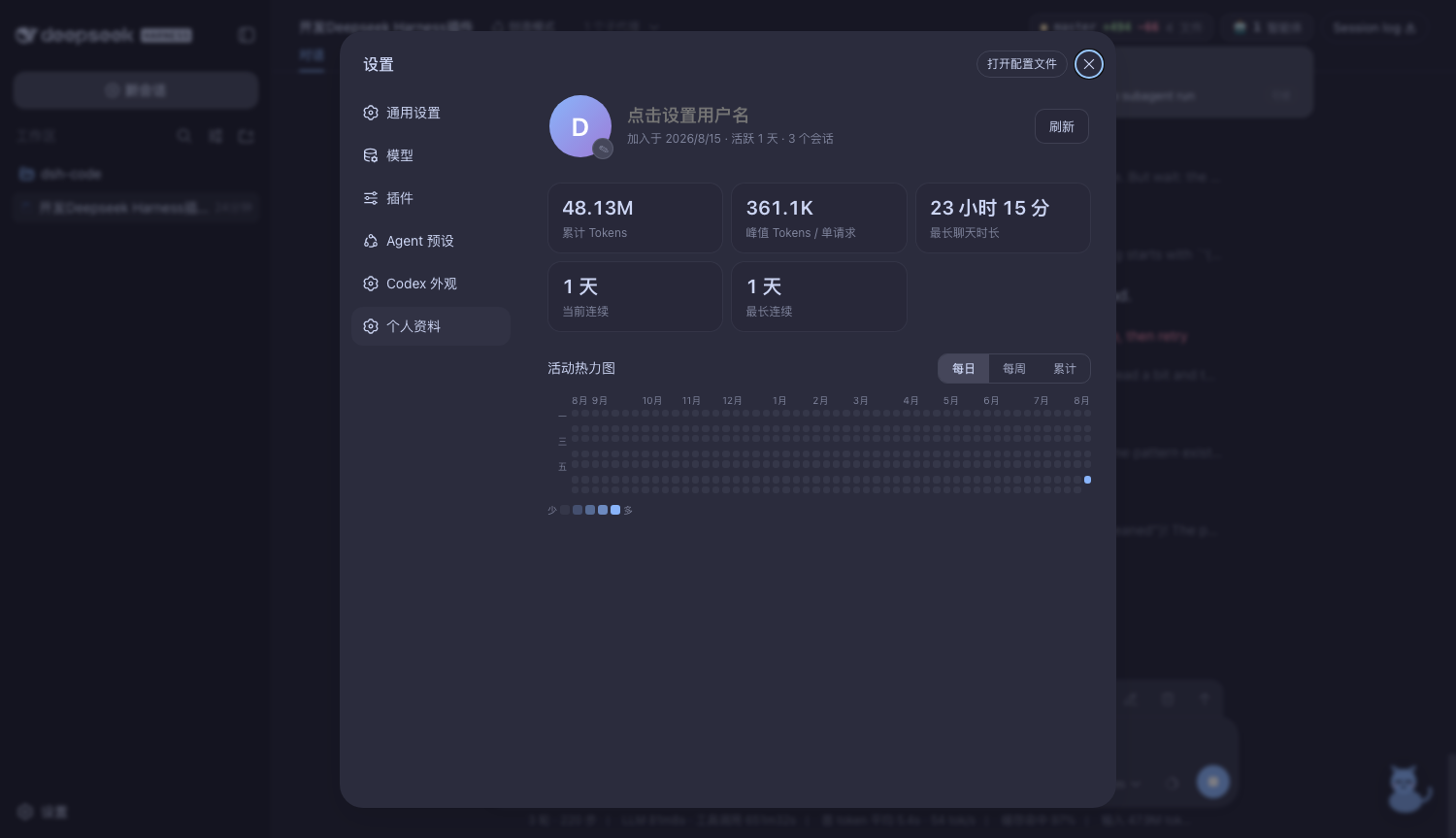
- a profile page with token usage statistics and a usage heatmap;
- four Catppuccin themes: Latte, Frappé, Macchiato, and Mocha, with background image support;
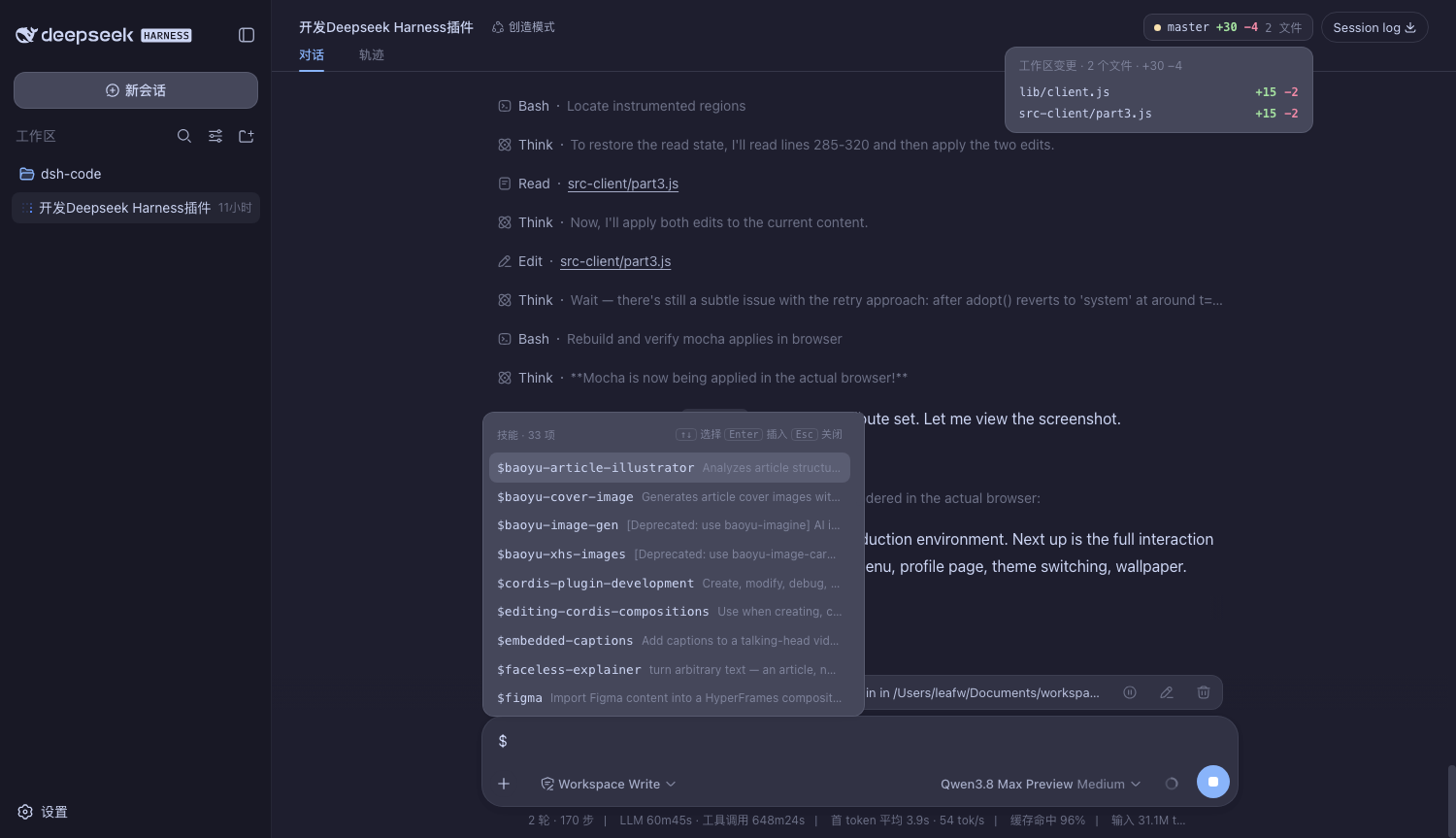
- a Skills shortcut, where typing
$in the input box searches and inserts skills; - a redesigned home page, where common prompts can become shortcut cards;
- a small status cat in the lower-right corner that actively reminds you when a task needs confirmation.
Below is the home page with wallpaper enabled. I personally like the feeling of turning a tool into something familiar. It does not materially help with writing code, but mood still matters.
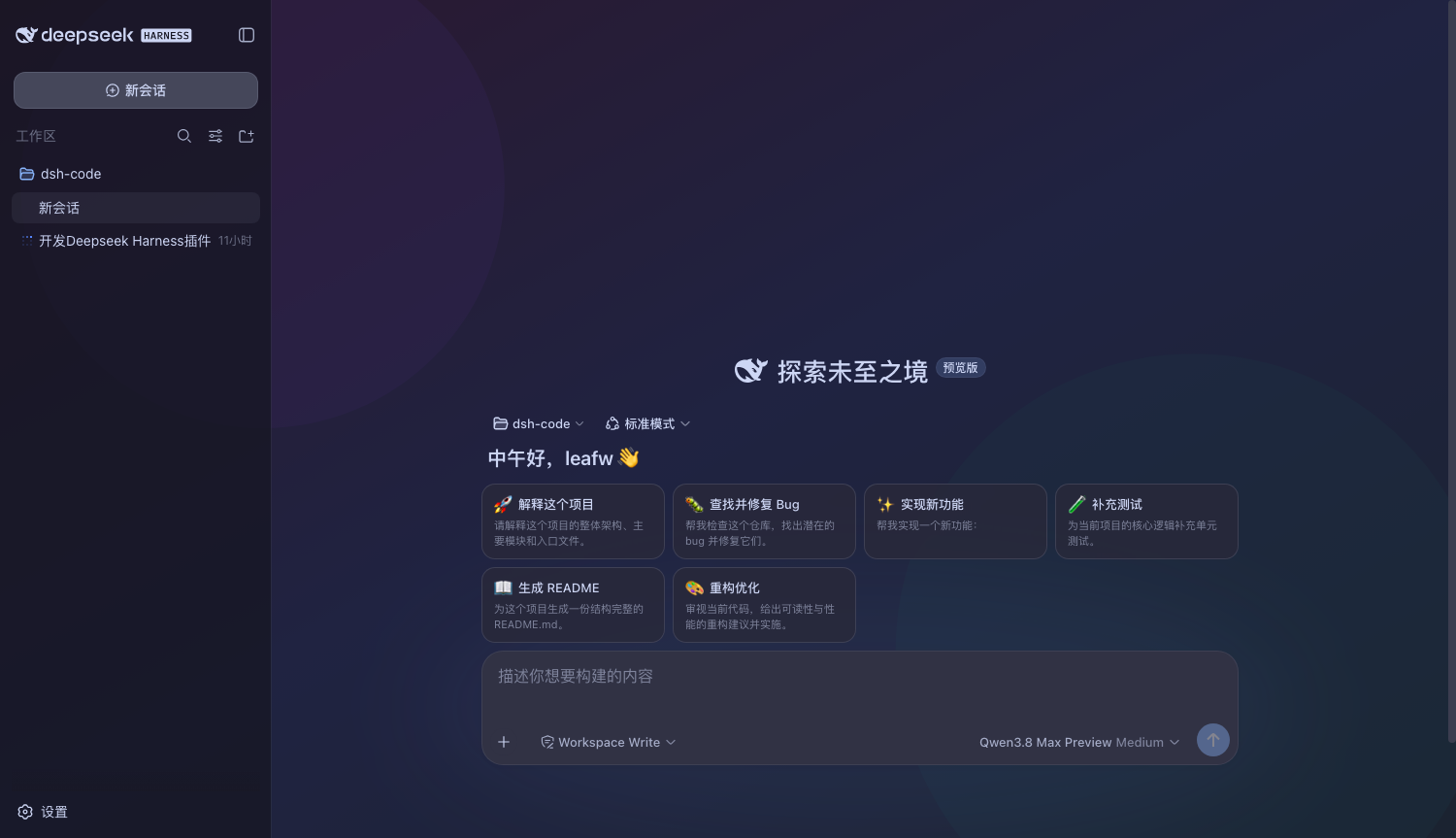
None of these features is complex on its own, but together they change the experience quite a bit. The subagent board and Git changes board are especially useful. The longer an Agent runs in the background, the more I want to know what step it is on. When many files are modified, I also want a rough sense of how large the diff is.
Codex gave me a lot of reference here. I did not intend to copy DeepSeek Harness into another Codex. I only wanted to add the feedback patterns I had already become used to. This is exactly where the plugin mechanism helps. I do not need to persuade the official team to accept this product judgment. If it works for me, that is enough.
The Skills handling also follows my habit in Codex. After typing $, I can directly search the currently available skills. I do not need to remember the full name, and I do not need to leave the input box.
From the start of implementation to a mostly complete version, the plugin took about one and a half hours.
There was also a very real small incident. I gave it the task before going to bed, but I had not enabled Full Access mode. It did not run for long before it hit a command that required confirmation and paused. The next morning, I manually approved several execution permissions, and only then did it continue and finish the rest.
So that “one and a half hours” does not mean I sat in front of the computer watching it run continuously for one and a half hours. My involvement was mainly describing the requirements, approving a few commands, and checking the final result. If I had configured permissions properly before sleeping, the whole process should have been smoother.
This is also a useful reminder: when letting an Agent run autonomously for a long time, model capability is only part of the story. The permission strategy directly affects whether it can finish the task. Being too cautious causes frequent pauses. Opening permissions too widely means you take on more risk. In the future, I will still decide based on the project. For familiar and well-isolated repositories, I can loosen permissions a bit. For important projects, I will keep confirmation steps.
The model used this time was Qwen3.8-Max. The cache hit rate was around 96%. I think that is quite good. For a long task that repeatedly reads a project and keeps modifying the same group of files, cache hit rate matters a lot. Otherwise, both cost and waiting time increase noticeably.
The profile page scans session logs and summarizes cumulative tokens, peak tokens, longest chat duration, and continuous usage days. The image below was captured when the plugin was basically complete. It showed 48.13M tokens at the time. That number should be roughly right, though I still need to test it for a while to see how accurate it is.
What surprised me more was the quality of the result.
After the plugin was generated, there were basically no major problems. The main features all worked. Later I adjusted some styling and added a few small features, and I did not run into structural issues that required starting over. For an Agent that had just been released, with an interface that still clearly feels experimental, this result exceeded my expectations.
Of course, one successful run is not enough to prove that it is stable across all coding tasks. This plugin is very close to DeepSeek Harness’s own tech stack and plugin system. It could read its own project structure and knew where to extend things, so this was a task well suited to it. Whether it is reliable for large projects, unfamiliar codebases, and long refactors still needs more use.
I Can Accept the Roughness for Now
If we only compare the default experience, it is hard to say that DeepSeek Harness is better than Codex or CC right now. Many details still need work. The plugin ecosystem has just started. Compatibility can change at any time. Since the official team has already marked it as Developer Preview, judging it by production-tool standards would not be very fair.
What I care about more is something else: it lets users decide what the product should look like.
When using Coding Agents before, I often thought, “It would be nice if there were a status panel here.” Then nothing happened. At most, I could write a script or wait for an official update. DeepSeek Harness shortens that distance. You can describe the requirement directly, let the Agent build the feature inside the existing plugin system, and then plug it back into your own workflow.
It feels a bit like tinkering with editors in the early days. The default setup may be average, but themes, shortcuts, plugins, and workflows can all be adjusted to your own habits. In the end, everyone’s version will look a little different.
This obviously brings new trouble too. Plugin quality will vary. Upgrades may break existing configurations. Security boundaries need your own judgment. What a plugin can access, what commands it can execute, and whether it sends data outside cannot be ignored just because installation is convenient. The more freedom you get, the more responsibility you take.
For geek users, though, these troubles are probably part of the fun.
I Am Going to Let It Replace CC for Now
My current conclusion is simple: DeepSeek Harness is already usable for coding.
This judgment is heavily shaped by personal preference. I currently have a Codex subscription and subscriptions to other coding plans. A coding plan with CC is certainly good, but CC does not have a GUI client I like, so using it has never felt that smooth to me. Now DeepSeek Harness can even be shaped into the kind of client I prefer. That fits my taste very well.
I have already added most of the things I felt were missing. I may later add more useful features such as command-line support and file previews. Next, I plan to let DeepSeek Harness replace CC for a while and see whether it can stabilize in daily development. I will mainly watch the success rate of long tasks, plugin compatibility after upgrades, and the real token cost.
Building a Coding Agent interface that fits my habits in one and a half hours already says something about its potential.
DeepSeek Harness is indeed rough right now. But when a tool lets me personally change almost every annoying part, my tolerance for roughness becomes much higher.
Enough thinking. Use it first.